
Comparisons & Fees
Binance Fees in Brazil (2026): Pix, Trading, Withdrawals & Convert
Understand spot, Pix, withdrawal, P2P, and Binance Convert costs, with a worked formula for checking the implicit quote difference before confirming.
Before buying, converting, or withdrawing, a better question than “what is the Binance fee?” is: how much will I receive after every cost? The final amount can reflect a trading fee, the difference between the quoted and reference price, a withdrawal charge, and sometimes a payment-channel cost.
This guide explains how to identify each component when using Binance from Brazil. Conditions vary by product, VIP tier, asset, network, account, and time, so the amounts shown before confirmation are the final source for your transaction.
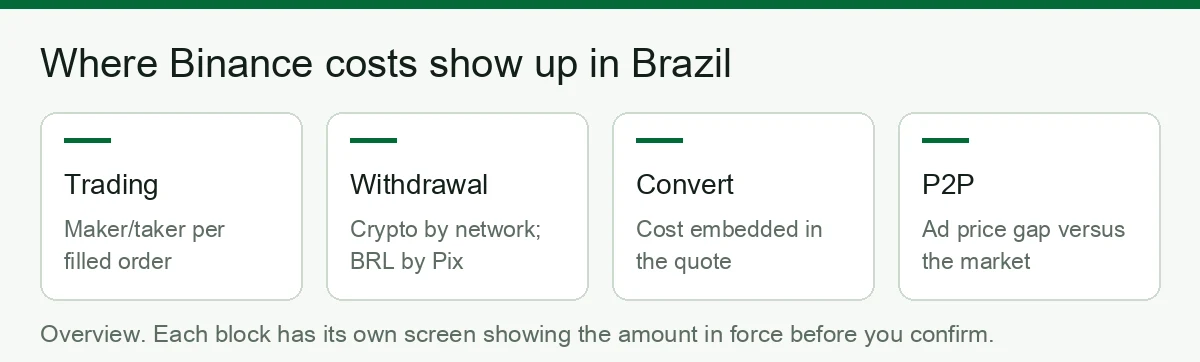
Quick answer: where Binance costs appear
| Operation | What may affect the cost | Where to check |
|---|---|---|
| Spot buy or sell | Maker/taker fee and execution price | Order preview and trade history |
| Binance Convert | Difference between the quote and a comparable reference price | Convert preview and spot market at the same time |
| BRL deposit or withdrawal via Pix | Any charge shown for the channel and account | Confirmation screen |
| Crypto withdrawal | Withdrawal charge for the selected asset and network | Network selector before withdrawal |
| P2P | Advertised exchange rate and any rules that apply to your role | Final ad quote and fee page |
Check the current official spot trading fee schedule and official crypto withdrawal fee page. Availability and values may differ by region and account.
1. Spot trading fees: maker, taker, and execution price
The spot fee depends on your tier, trading pair, and whether the order adds or removes liquidity. A limit order is not automatically a maker order: if it crosses the book and executes immediately, it may be charged as taker.
Measure the transaction in two parts:
- Trading fee = executed value × the rate shown for your account.
- Execution cost = the difference between the price you expected and the average price actually filled.
BNB, referral, campaign, or VIP benefits may be available, but they should not be described as permanent. Verify the effective rate in your account and the terms displayed when you register or trade.
2. Pix deposits and withdrawals in BRL
Do not assume a previously advertised condition still applies. Before confirming a BRL deposit or withdrawal, check:
- the amount sent;
- any displayed charge;
- the net amount to be received;
- the estimated processing time and payment provider.
For the deposit flow, see How to deposit BRL via Pix.
3. Crypto withdrawals: the asset and network change the cost
The exchange withdrawal charge shown to you is not necessarily the same as the blockchain's current transaction cost. It is set for each asset-and-network combination and can change.
Compare the net amount arriving at the destination, not only the network name. The receiving wallet or exchange must support that exact network. A mismatch can require recovery or cause a loss of funds.
For USDT, use Cheapest Network to Send USDT as a comparison framework, then recheck the live withdrawal preview before acting.
4. Binance Convert: how to estimate the embedded quote cost
Convert may show a final quote without listing a separate trading fee. That does not automatically mean there is no cost: the quoted price can differ from a comparable spot reference.
Worked example
Assume, only for illustration, that at the same moment:
- the comparable spot reference is BRL 5.20 per USDT;
- Convert quotes BRL 5.25 per USDT;
- you want to convert BRL 1,000.
Convert would deliver approximately 190.476 USDT (1,000 ÷ 5.25). At the BRL 5.20 reference, BRL 1,000 corresponds to approximately 192.308 USDT.
Estimate the implicit quote difference with:
(Convert unit price ÷ reference unit price − 1) × 100
In this example: (5.25 ÷ 5.20 − 1) × 100 ≈ 0.96%.
This is a teaching example, not a current Binance quote. Compare at the same time, for the same asset and transaction direction. Quotes can move while you check.
5. P2P: “no fee” does not guarantee the best price
For a buyer, much of the effective cost can appear in the advertiser's exchange rate. Compare how much USDT you receive for the same BRL amount, while also considering limits, payment method, counterparty history, and the rules that apply to your transaction.
Checklist before you confirm
- Record how much you pay and receive.
- Check every explicitly displayed charge.
- Calculate the effective unit price.
- Compare an equivalent alternative at the same moment.
- For withdrawals, verify asset, network, address, and net amount.
- Save the receipt and transaction ID.
Reduce costs without adding unnecessary risk
- Compare Convert, spot, and P2P using the net result, not a “zero fee” label.
- Before splitting withdrawals, check whether each one carries a separate charge.
- Use only networks and order types you understand; a small saving is not worth an incompatible-network mistake.
- Recheck account-specific benefits because campaigns and conditions can change.
- Review the withdrawal section alongside Cheapest Network to Send USDT.
Binance fees: frequently asked questions
Does Binance actually charge fees? Yes — in five different places, in two forms: an explicit fee (trading, withdrawals, fiat rails) or a cost embedded in the price you accept (Convert, P2P). Only the first kind appears on a line labelled "fee".
What is the withdrawal fee? There is no single value: it changes by asset, by network and by whether you are withdrawing crypto or fiat. The withdrawal screen shows the amount in force, plus the amount that will actually arrive, before you confirm.
Why is my trading fee different from someone else's? Because it depends on whether your order filled as maker or taker, and on the discounts active on your account — paying fees in BNB, your volume tier and the referral code used at sign-up. The starting point is explained in Binance Convert vs spot and in what is BNB.
Is Convert really free? There is no fee line, but there is a cost inside the quote. Compare the Convert price against the spot price for the same pair in the same minute: the gap, as a percentage, is what you paid.
What about P2P? Buyers usually pay no platform fee — the cost sits in the ad's margin versus the market reference, and it applies twice if you buy and sell on the same day (P2P vs spot).
How do I know what I really paid? Compare what left your account with what arrived on the other side. That single difference captures every fee and every spread, whatever they are called.
Update and sources: reviewed on August 12, 2026. Conditions change; always confirm the official fee pages and the transaction preview.
Affiliate disclosure: this article contains a Binance referral link, code BNB6669. Any available benefit is the one displayed in the registration terms. This site may earn a commission at no additional cost to you.
Risk warning: cryptocurrencies are volatile, high-risk assets; you may lose your entire capital. This content is educational and does not constitute financial, legal, or tax advice.
Regional notice: this content is intended for readers in Brazil. Check the rules that apply in your jurisdiction.